
Planning at a glance
The planning words in Yipadoo, how they nest from Goal down to Milestone, and which plan unlocks which part.
Planning in Yipadoo turns a big outcome into checkpoints you can finish, and shows how far along each one is. You can skip all of it and use tasks alone (see Your first task). Add planning when you want to see how today's work adds up to something.
The words you will meet#
Seven terms cover the whole system. The first four are the ones to learn first.
| Term | What it is |
|---|---|
| Goal | A quarterly outcome delivered by projects, such as "10 clients paying through the portal by 15 Dec". |
| Project | A plan for an outcome. It holds tasks, milestones and, if you want them, Phases. |
| Phase | An ordered step that groups milestones in one project, such as Design, Build, Launch. |
| Milestone | A checkpoint in a project plan. It is finished when the tasks linked to it are. |
| Final milestone | A milestone you have promised to someone: it names what they get (the Claim) and who it is for. |
| Area | An optional part of a workspace, such as a client, product, program or internal team. |
| Workspace | A business or team. It holds its own projects, people and Goals. |
How they nest#
Read the chain from the outside in:
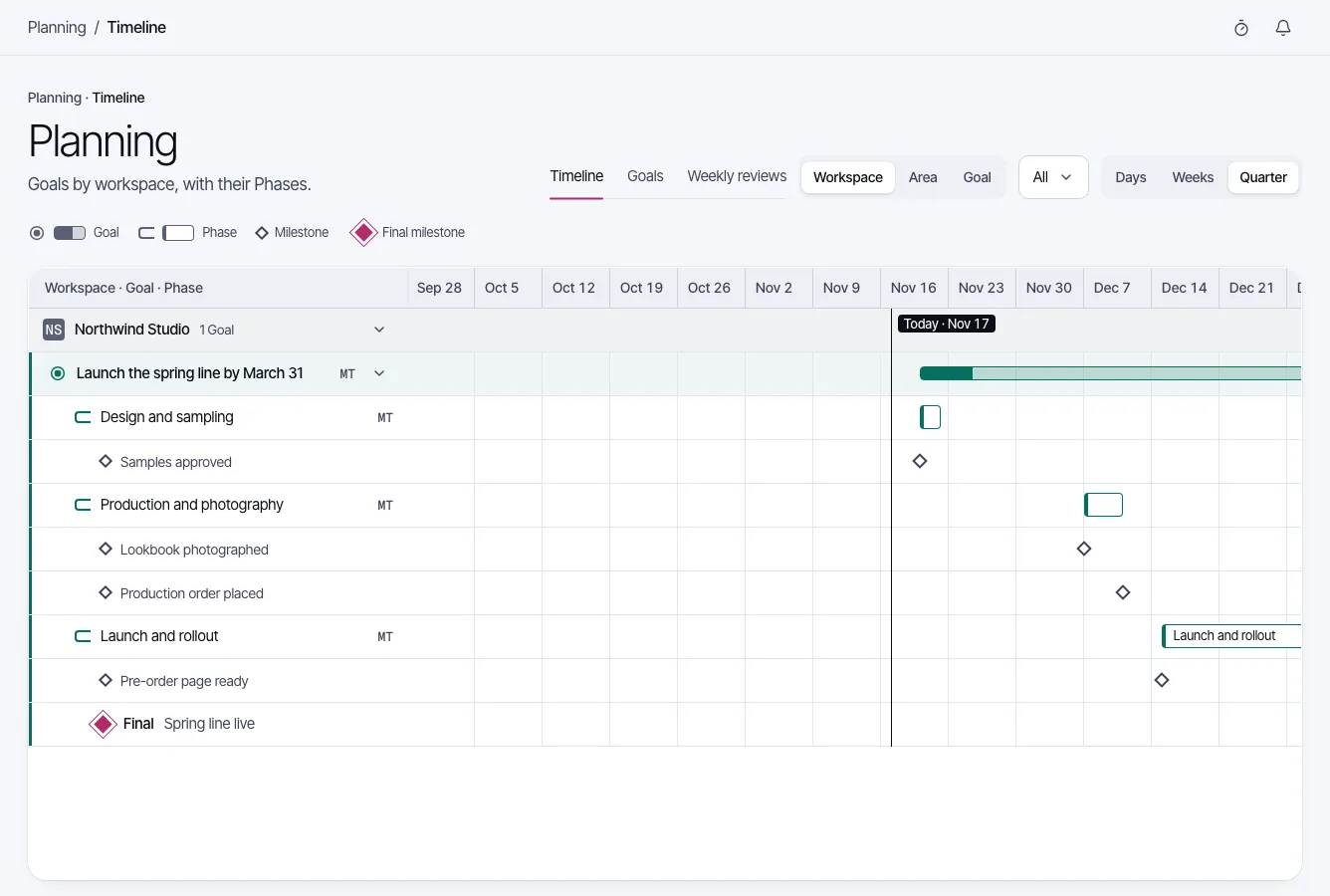
Workspace › Area (optional) › Goal › Phase › Milestone › Task
A Goal is delivered through Phases, and each Phase groups milestones. One of those milestones can be the Final milestone, the promise that closes the Goal. A Goal has at most one Final milestone across all its Phases.
Two links in that chain are optional. A project can have milestones with no Phases; they sit under Ungrouped. A project can also sit on its own with no Goal above it. Your personal projects have no Area, because Areas belong to workspaces.
A worked example#
Northwind Studio is a workspace. This quarter it wants clients paying through a new portal.
- The Goal is "Launch the client portal", with the expected outcome "10 clients paying through the portal by 15 Dec".
- Its project, "Client portal", has two Phases: Build and Launch.
- Build holds the milestones "Checkout works" and "Billing connected". Launch holds "Pilot with three clients".
- "Pilot with three clients" is marked as the Final milestone. Its Claim is "Public beta live" and it is for "Northwind clients".
- Each milestone links to real tasks. When the last linked task is done, the milestone reads Reached, the Phase's progress moves, and the Goal's progress follows.
If Northwind also served several clients from one workspace, each client could be an Area, and the Goal could sit in the Area it belongs to.
The Planning row and its views#
Planning is the chart row in the left rail, below My work and Projects. Press g then l to open it. A segmented control at the top switches between:
- Timeline: your Goals with their Phases, milestones and Final milestone laid out against the quarter, or a chart of your dated tasks grouped by Goal.
- Goals: your quarterly outcomes, with owner, target date, status and percent done. This view appears only when Goals are turned on for you.
- Weekly reviews: a short check-in on each active Goal you own.
Inside one project, the Plan tab holds the same pieces at project scale: the milestones, the Phases and a Roadmap chart. See Milestones and Phases.
Which plan unlocks what#
Free is enough to start. Pro and Team add the planning layer, and Plans and pricing has the prices.
| Free | Pro | Team | |
|---|---|---|---|
| Active projects | Up to 5 personal | Unlimited | Unlimited |
| Milestones | Only in projects your active Goal links; elsewhere, existing ones stay readable | Yes | Yes |
| Phases | No | Yes | Yes |
| Save plan and New plan on a milestone | No | Yes | Yes |
| Final milestones | No | Yes | Yes |
| Project Roadmap | No | Yes | Yes |
| Templates | Preview only | Save and use | Save and use |
| Goals in a workspace | No | Only in a workspace you run alone | Yes |
| Team view of the Timeline | No | No | Yes, for admins of a workspace that runs on Team |
| Decisions | Yes | Yes | Yes |
| Glossary | Yes | Yes | Yes |
Where planning is locked, the app says "Planning requires Pro" with a See plans link, and what you already built stays readable.
Note: Your plan, a trial or beta access can change what you see. The app's own message on a locked screen is the final word on what your account has.
Related#
- Your first plan walks through building one from scratch.
- Projects covers where a project lives and how to find it.
- Milestones is where the plan itself gets built.
- Goals covers the quarter above the projects.
- Areas covers splitting a workspace by client or product.
- Decisions covers the rules and choices a project or workspace follows.
- Glossary covers the words a project or workspace uses and what they mean.